Discover how automation data entry transforms tedious tasks into efficient workflows. Learn practical strategies to scrape, organize, and export data with ease.
Tired of staring at endless spreadsheets? Manual data entry is a soul-crushing task every team knows too well. Data entry automation is your escape plan. It’s about using smart, AI-powered tools to grab, sort, and move data from websites and documents right into your systems—completely hands-free. This isn't just a small tweak; it's a total overhaul that turns a slow, mistake-ridden chore into a lightning-fast, ultra-reliable workflow.
The True Cost of Manual Data Entry
We’ve all been there: copying and pasting from one window to another, hunting down typos, and wondering if there’s a better way. That’s the daily grind of manual data entry. It’s not just boring; it’s a silent killer of productivity and profit. Every minute an employee spends on these repetitive tasks is a minute they aren’t using for strategic thinking, customer engagement, or growing the business.
The numbers are staggering. Human errors in data entry lead to about 24,000 hours of pointless rework every year. For the average organization, that translates to a staggering USD 877,000 lost annually just from fixing financial data mistakes. It's no wonder that 66% of businesses are using automation to claw back that lost time and money. You can dive deeper into these workflow automation market trends with recent research.
Beyond Time and Money
The damage from manual processes goes way beyond the obvious costs. It creates operational sludge that bogs down entire teams and holds your business back.
Decision-Making Paralysis: Critical business decisions get stuck in limbo while everyone waits for data to be manually compiled. You can watch market opportunities slip away while you’re wrestling with a spreadsheet.
Crushing Team Morale: Let's face it, nobody enjoys mind-numbing work. Repetitive tasks are a one-way ticket to employee burnout. Automating this frees up your team to tackle the creative, engaging problems that make work meaningful.
Garbage In, Garbage Out: Every tiny mistake pollutes your dataset. This leads to flawed reports, misguided strategies, and a fundamental lack of trust in your own analytics.
At its core, the problem is simple: Manual data entry just doesn't scale. As your business grows, your data grows with it, but your team's capacity for manual work is a fixed resource. This creates a bottleneck that chokes your potential for growth.
To put manual data entry in the rearview mirror, it helps to understand the tech that makes automation possible. A big piece of the puzzle, especially for digitizing physical documents, involves understanding Optical Character Recognition (OCR). But modern browser-based automation tools take this idea and run with it, using AI to read and structure data directly from any website. Suddenly, the entire web becomes your database.
Manual vs. Automated Data Entry at a Glance
Let's put them head-to-head. The contrast is stark, highlighting just how much you stand to gain by making the switch.
Metric | Manual Data Entry | Automated Data Entry |
|---|---|---|
Speed | Slow, limited by human typing speed. | Extremely fast, processing thousands of entries in minutes. |
Accuracy | Prone to human error (typos, omissions). | Highly accurate, with error rates near zero. |
Cost | High labor costs, plus costs of error correction. | Lower operational costs; ROI seen in months. |
Scalability | Poor. Adding volume requires hiring more people. | Excellent. Scales instantly with business needs. |
Employee Impact | Leads to burnout and low job satisfaction. | Frees up staff for strategic, high-value work. |
The takeaway is clear. While manual entry was once the only option, today's automation tools offer a faster, cheaper, and far more reliable alternative that empowers your team and fuels growth.
Build Your First Automated Workflow in 5 Minutes
Enough talk, let's get practical. We're going to build your first workflow right now. No code, no confusing setups. We'll tackle a classic use case: building a targeted lead list from LinkedIn Sales Navigator.
Think about it. You're a sales rep hunting for Marketing Managers at SaaS companies in California. Doing this by hand is a soul-crushing exercise in copy-paste. With automation? It’s a few clicks. I’ll walk you through how to spot the data you need—names, titles, companies—and then unleash an AI agent to do all the grunt work.
This is the fundamental shift we're talking about: moving from a tedious, manual slog to a clean, automated flow that just works.
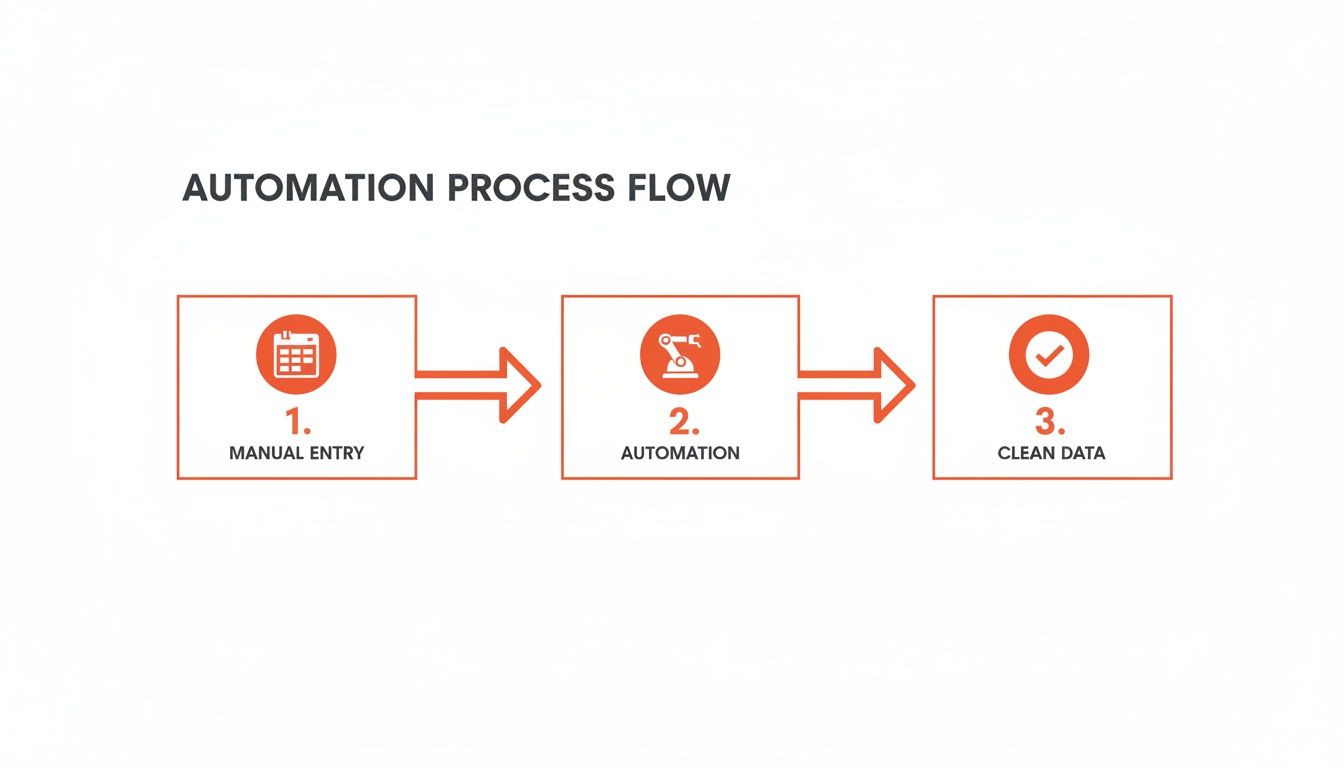
Automation is the bridge that takes raw information and transforms it into structured, valuable data, cutting out the most error-prone step: us!
Step 1: Pinpoint Your Target Data
First, you can't automate what you haven't defined. Before you touch any tools, you need to know exactly what information you’re after. For our LinkedIn Sales Navigator example, we want a clean prospect list.
Here’s the data we’ll be grabbing:
Full Name: The prospect’s complete name.
Job Title: What they do (e.g., "Marketing Manager").
Company Name: Where they work.
Company Website: The company’s URL.
LinkedIn Profile URL: A direct link to their profile for easy outreach.
This clarity is crucial. It gives your AI agent a precise checklist, so it doesn't pull useless info. It’s the difference between giving a research assistant a clear brief versus a vague request.
Pro Tip: Always start with a laser-focused search on the source website. The cleaner your initial search results, the better your automated data will be. Garbage in, garbage out—it’s as true here as anywhere else.
Step 2: Launch Your AI Agent
Okay, you’ve identified your targets. Now for the fun part. Modern browser-based automation tools come with pre-built templates for popular sites like LinkedIn. This is a game-changer because you don't have to build anything from scratch.
Here's the process:
Navigate to your search results page on Sales Navigator.
Open the browser extension.
Pick the right template for the job.
Click "Run."
You can watch the magic happen. The AI agent zips through the page, scraping the data and neatly organizing it into a list right inside the extension. Rows fill up with names, titles, and company details in real-time, turning a static webpage into a usable spreadsheet. The whole thing often takes less than 60 seconds.
For more advanced jobs, like ripping data out of messy PDFs, the process is a bit different. We've got a deep dive on how to master PDF data extraction to Excel if you're curious.
To start your own automation journey, it's worth checking out different platforms. A great way to see what's possible is to explore samskit's products and services. The key is to find a tool that feels intuitive and solves a real headache for your team. Try this workflow today.
Powerful Automation Recipes for Your Team
Alright, let's get practical with some real-world examples you can use today. I've put together a few of my favorite "recipes" that show how powerful automated data entry can be for different teams.
All you have to do is pick one that fits your goals, tweak the fields you want to grab, and let the AI agent do its thing in your browser. The best part? Your data is ready to go in a clean CSV file the second it's done.
Monitor Competitor Pricing on Shopify
This is a game-changer for marketing and e-commerce teams. Imagine tracking your rivals' pricing, SKUs, and stock levels across their entire Shopify store without lifting a finger. Set this recipe to run hourly, and you'll be the first to know about a flash sale or price drop, giving you the chance to react instantly.
Source: Any Shopify store’s product pages.
Fields to Grab: Product name, SKU, current price, and stock status.
Result: A clean CSV with columns like Name, SKU, Price, Availability.
A quick pro tip: make sure your mapping rules convert the price field into a number. This makes it a breeze to sort and analyze later.
Find Your Next Hire on Job Boards
Recruiters, you can save hours every day by automating how you gather profiles from job boards like Indeed or LinkedIn. Instead of manually copy-pasting names, roles, and skills, this workflow does it for you.
Head to a job board and run a search.
Apply your filters—location, experience, etc.
Fire up the AI agent and watch it pull the details from every profile.
Export your perfectly formatted list.
To keep things tidy, set the email field as the unique key. It's a simple way to get rid of duplicates automatically.
Scrape Every Review from G2 and Capterra
For market researchers, this recipe is pure gold. Manually sifting through hundreds of reviews on sites like G2 or Capterra is a soul-crushing task. Let's automate it. You can instantly pull user ratings, review text, and date stamps to spot sentiment trends and feature requests without reading a single word yourself.
Platforms: Target G2 and Capterra review pages.
Data Points: Rating, review title, the full review, the reviewer's role, and the date.
Result: A clean CSV with columns for Rating, Title, Review, Role, Date.
The shift to cloud-based tools is making browser-based automation more crucial than ever. It's no surprise that by 2025, a staggering 51.60% of the data center automation market will be cloud deployments. With a 21.65% CAGR projected through 2031 and 83% of workloads moving to the cloud, no-code scraper tools are no longer a "nice to have"—they're essential. You can learn more about data center automation trends if you want to dive deeper.
Making These Recipes Work for You
Think of these recipes as starting points. Feel free to mix and match them or adjust the schedules to fit your team's rhythm. Every agent you create can be saved as a template, so you never have to start from scratch.
“These recipes cut data collection time by up to 90%, letting teams focus on insights.”
You're not just saving time; you're aligning your workflow with modern cloud trends and leaving manual drudgery behind. Give one of these a shot—you’ll see the time savings almost immediately.
Customizing and Scaling Your Automation
The beauty of these templates is their adaptability. You can easily switch your source from Shopify to Amazon or another marketplace without having to rebuild the entire workflow. Use the built-in mapping tools to clean up and standardize your data before it even hits your spreadsheet.
Team | Source | Key Data | CSV Headers |
|---|---|---|---|
Marketing | Shopify | Price, Stock | Name, SKU, Price, Availability |
Recruiting | Indeed/LinkedIn | Skills, Location | Name, Role, Skills, Contact |
Research | G2/Capterra | Rating, Review | Rating, Title, Review, Date |
Need to scale up? Just duplicate a recipe and point it to a new source. It’s that simple.
Your Team's Next Steps
Ready to jump in? Here’s how to get started in minutes:
Pick one recipe that tackles your biggest data entry headache.
Install Clura and run the template right from the browser extension.
Open that clean CSV and start sharing insights with your team.
You’re not just automating a task; you’re lowering errors, speeding up your workflow, and freeing up your team to be more creative.
Set up routine checks for consistent, hands-off updates.
Merge datasets from different recipes to uncover cross-team insights.
Schedule your agents to run overnight so the data is waiting for you with your morning coffee.
Head over to clura.ai and start your first automation. Once you get a taste of this, you’ll never go back to manual data entry.
Putting Your Automated Data to Work
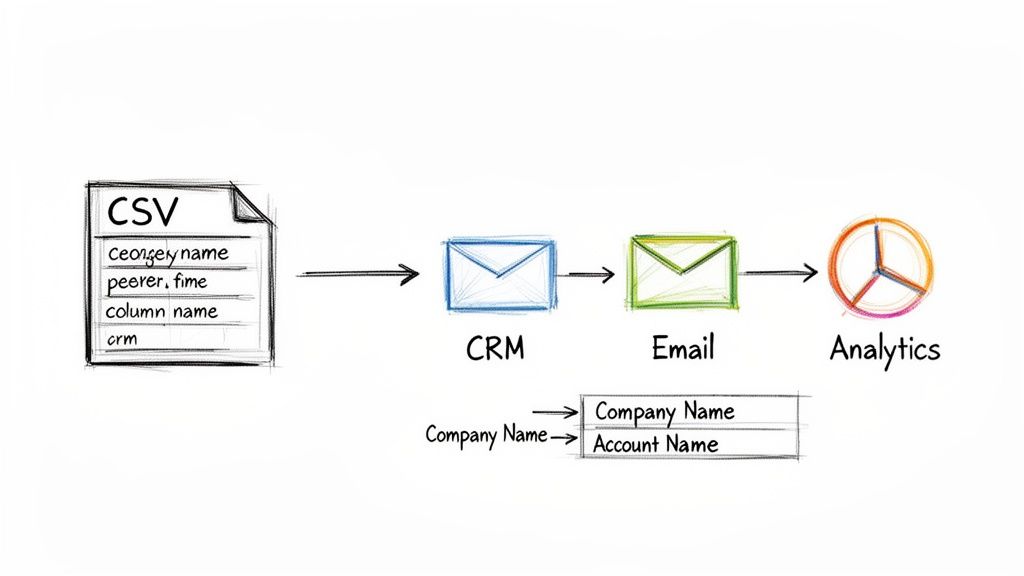
Grabbing perfectly clean data with a single click is a massive win, but it's only half the battle. The real magic happens when that data starts powering your business systems. This is where we build the bridge from your browser straight into your CRM, email platform, or analytics dashboard.
Think of your newly scraped data as high-octane fuel. It's potent, but it’s useless sitting in a CSV file. We need to get it into the engine. The goal is to make that transfer instant, so your team can act on fresh insights immediately—not after a day spent wrestling with import errors.
From Scrape to System in a Flash
Modern automation tools are built for action. After your AI agent runs, you get a clean, structured CSV file, primed and ready for immediate use. This little CSV file is your golden ticket. It works with pretty much every business app you can think of, from giants like Salesforce and HubSpot to marketing staples like Mailchimp and Google Analytics. The process becomes as simple as clicking "Export" in one system and "Import" in another.
And if your team lives in spreadsheets, you can effortlessly convert your CSV to a Google Sheet. This creates a single, shareable source of truth that everyone can access.
Smart Data Mapping: The Secret to Flawless Imports
Ever tried to import a CSV into your CRM, only to be met with cryptic error messages? The culprit, almost every time, is mismatched data fields. This is where a few minutes of upfront planning will save you hours of agony later. Data mapping is just a fancy way of telling your system where each piece of incoming information is supposed to go.
Here’s a classic example:
Your scraped data has a column named "Company."
But your Salesforce CRM expects that field to be called "Account Name."
Without mapping, that import is dead on arrival. The best automation tools let you rename your columns before you export the file, guaranteeing a perfect match every time. It's a simple step that keeps your data clean and saves you a massive headache.
Pro Tip: Create a mapping "cheat sheet" for your most important platforms. Write down whether your CRM uses "First Name" or "FirstName." Documenting these details will save your team an incredible amount of time and prevent bad data from polluting your systems.
Building Your Data Pipeline
Once you get your mapping rules dialed in, you've officially built a repeatable data pipeline. This isn't about a one-time import; it's a strategic workflow that constantly feeds your business fresh, actionable intelligence.
Suddenly, things get really exciting:
Your sales team? They can scrape a hot lead list from LinkedIn, map the fields to your CRM, and instantly add hundreds of perfect-fit prospects into their outreach sequences.
And the marketing team? They can monitor competitor pricing, map that data into an analytics tool, and track market trends without manually updating a spreadsheet again.
This seamless flow is the entire point of data entry automation. You’re closing the loop between gathering information and actually using it. You're not just moving data around—you're building a smarter, faster, and more data-driven operation.
How to Measure Your Automation ROI
So, you’ve set up this awesome automation workflow. It feels faster, but how do you prove it's a smart business move? The answer is in the numbers—the return on investment (ROI). Shifting from manual work to data entry automation isn't just about a morale boost; it’s about creating real, tangible value you can show your boss. Let's break down how to calculate the returns without getting lost in a spreadsheet.
Start with Time Savings
Time is money. This is the simplest and most direct win. First, figure out exactly how many hours your team is getting back every week. Think about a sales rep who used to spend five hours a week building lead lists. That's 20 hours a month—time they could have spent on demos, follow-up calls, and actually closing deals. If that rep's time is worth $50 an hour, you've just freed up $1,000 per month from that one task.
Here’s the simple math:
(Hours Saved per Week) x 4 x (Employee’s Hourly Cost) = Monthly Savings
Calculate the Cost of Errors
We’ve all been there. A typo in an email address bounces a crucial message. An incorrect price on a quote kills a potential sale. These manual errors create surprisingly big problems. A common manual error rate is around 3-5%. Think about the cost of fixing those mistakes or the opportunities you lose because of them. It's no surprise that 79% of organizations using automation see a positive ROI within the first year, and a huge chunk of that comes from wiping out these costly human errors.
Measure the Lift in Productivity
What does your team do with all this newfound time? They get more done. This increase in output is where the ROI story gets exciting.
For your sales team: Are they making more outreach calls? Booking more demos?
For marketing folks: Are you seeing a jump in qualified leads?
For researchers: How many more competitor profiles can they analyze each week?
A boost in output is a direct line to a boost in revenue. If your team can suddenly contact 25% more prospects every month, that’s a clear win that translates directly into a bigger sales pipeline.
Beyond the hard numbers, don't forget about the softer wins. Team morale skyrockets when you take tedious tasks off their plates. And having faster access to market intelligence is a massive competitive advantage.
When you’re ready to find the tools that deliver these results, this guide on the best data extraction software is a great place to start.
Your Automation Questions Answered
It’s natural to have questions when you’re exploring new tools. Automating data entry can feel daunting at first, but it doesn’t have to be. Let’s break down the most common concerns so you can dive in with confidence.
Is It Difficult to Set Up an Automated Data Entry System?
Not at all. Getting started often takes less time than you think. Modern platforms require zero coding and come with pre-built templates that handle the heavy lifting. In just a few minutes, you can have your first workflow running.
Here’s a quick look at the process:
Navigate to the page you want to scrape.
Highlight the elements you need.
Click once and let the AI agent do the rest.
What Kind of Data Can I Extract with Automation?
If it’s organized on a webpage, you can probably grab it. Companies use automated scraping for tasks such as:
Lead Information: Job titles, company names, and contact emails from LinkedIn.
Product Data: SKUs, prices, and inventory levels on e-commerce sites.
Candidate Profiles: Skills, work history, and portfolio URLs from job boards.
Market Research: Ratings, reviews, and pricing trends across multiple platforms.
“When data follows a pattern, it becomes a searchable goldmine. Turn your browser into a dynamic database by letting AI handle the grunt work.”
How Does Automation Handle Different Website Layouts?
The magic is in pattern recognition. Many tools include smart templates for popular sites like LinkedIn and Amazon. For specialized sites, a point-and-click interface lets you train the scraper in seconds.
With this approach, you simply:
Show the scraper which fields to collect.
Let it learn the page structure.
Run your workflow without tweaking any code.
Is Automated Data Scraping Legal and Ethical?
Gathering publicly available information is a common practice for research and lead generation. That said, ethical scraping means operating responsibly:
Respect each site’s terms of service and privacy policies.
Don’t pull more personal data than is publicly listed.
Pace your requests so you never overload a server.
By following these guidelines, you’ll keep your activities above board and your data reliable.
Ready to stop copy-pasting and start automating? Clura makes it a breeze. Install our Chrome extension and launch your first workflow at no cost.
