Explore price history on amazon and learn how to track price moves with the best tools, keeping you ahead of every deal.

Ever watched an item on Amazon only to see its price bounce around like a yo-yo? It's a simple truth of the platform: prices are always on the move. We're not talking small, occasional shifts, either. A single product's price can swing wildly, sometimes multiple times a day. This isn't chaos; it's a calculated dance driven by powerful algorithms, competitor moves, and shifting demand.
Understanding how to check the price history on Amazon is the key to outsmarting the system, whether you're a bargain hunter or a seller trying to stay competitive. This guide will show you how to do it effortlessly.
Why Amazon Prices Are Always Changing
You add something to your cart, come back a few hours later, and the price has jumped. It’s a classic Amazon experience. The marketplace is a living ecosystem where prices react in real time. This constant flux isn't random—it's strategic.
In fact, a staggering 70% of Amazon sellers rely on dynamic pricing software to keep their edge. These tools constantly crunch data, automatically tweaking prices to respond to market changes. This creates a ripple effect that you see on the product page, making it essential to understand the story behind the price tag.
The Power of Dynamic Pricing Algorithms
Behind this volatility are smart algorithms. These systems analyze a ton of variables to pinpoint the perfect price—one that drives sales without sacrificing profit. It's like a non-stop, automated auction happening behind the curtain.
For example, a seller’s algorithm might shave a few cents off a price to undercut a rival and win the all-important “Buy Box.” That one tiny change can set off a chain reaction, prompting other sellers' algorithms to fire back with their own adjustments, often within minutes.
What does this mean for you? A marketplace where a single item’s price can change more than a dozen times a day. That's why checking the price history on Amazon is a non-negotiable step before you click "buy."
Key Factors That Influence Price Shifts
So, what exactly are these algorithms looking at? It’s more than just a head-to-head battle with competitors. If you know what to look for, you can start to anticipate when a price is about to drop or climb.
Here are the main drivers:
Competitor Actions: This is the big one. When a major seller drops their price, others almost always follow to avoid getting left behind.
Inventory Levels: A seller running low on a hot item might hike the price. If their warehouse is overflowing, they’ll slash prices to move product.
Major Sales Events: Think Prime Day, Black Friday, and Cyber Monday. These shopping holidays trigger massive, site-wide price drops. Historical data confirms these are often the best days of the year to buy.
Time of Day and Week: Even the clock matters. Some sellers adjust prices during peak shopping hours, like evenings or weekends, to maximize revenue.
Getting a feel for these forces gives you a huge advantage. You stop being a passive shopper and become a strategic one, ready to pounce when the moment is right.
The Problem with Manual Price Tracking
Let's be real: trying to manually track Amazon prices is like trying to catch rain in a thimble. It's a soul-crushing cycle of refreshing product pages, wrestling with clunky spreadsheets, and missing the best deals because a price changed while you were grabbing a coffee.
You start with the best intentions, jotting down the price of a new laptop. But soon, you're drowning in browser tabs and outdated numbers. By the time you’ve updated your spreadsheet, the prices have changed again. This manual struggle isn't just inefficient; it's a losing battle against algorithms that work 24/7.
Why Human Speed Can't Keep Up
The core issue is a mismatch of speed. You're a person trying to keep pace with automated systems built for split-second adjustments. Amazon’s marketplace is a relentless environment where prices are in constant motion.
Think about the popular Echo Dot—it launched at $49.99 but plummeted to as low as $19.99 during a Black Friday sale. That's a 61% drop! This kind of volatility is the norm. Across Amazon's vast catalog, prices can change every 17 minutes, driven by the 72% of sellers using dynamic pricing software. You can dig into these trends yourself with CamelCamelCamel's product analytics.
Without automation, you're not just working harder; you're working with incomplete, outdated information. You're making decisions based on a snapshot in time while the market has already moved on.
Key Limitations of Manual Tracking
Manual methods fall apart when you're dealing with the sheer scale and speed of e-commerce. You end up with more frustration than actionable data.
Inaccurate Data: The price you log at 10 AM could be irrelevant by 10:15 AM. Your spreadsheet quickly becomes a historical relic.
Missed Opportunities: The best deals often last for only a few hours. Without instant alerts, you'll miss those golden windows.
No Historical Context: Manual tracking tells you the price right now, not if it's a genuine bargain compared to its all-time low.
Impossible to Scale: Tracking one or two items is tedious. Monitoring an entire product category? Forget about it.
This is where dedicated price tracking tools and automation become an absolute necessity. They provide the precision, historical data, and instant alerts you could never achieve on your own.
Price Tracking Methods: Manual vs. Automated
Let's break down the real-world differences. It quickly becomes clear why one approach leaves you behind while the other puts you in the driver's seat.
Feature | Manual Tracking | Automated Tools (e.g., Clura) |
|---|---|---|
Accuracy | Low; data is outdated almost immediately. | High; real-time data ensures you're always up-to-date. |
Efficiency | Extremely time-consuming and labor-intensive. | Instant; set it up once and let it run automatically. |
Scalability | Poor; limited to only a handful of products. | Excellent; monitor thousands of products simultaneously. |
Historical Data | None; you only have the data points you personally record. | Comprehensive; view complete price history charts. |
Alerts | Non-existent; you have to check for price drops yourself. | Instant; receive email or push notifications. |
Insights | Minimal; you see a number, but not the story behind it. | Deep; analyze trends, competitor strategies, and seasonality. |
The takeaway is simple: automation transforms you from a frantic data-gatherer into a sharp, strategic decision-maker.
The Shift to Automated Insight
Imagine getting an email the second a product on your wishlist drops to its lowest price in six months. Or picture a dashboard showing exactly how your top competitor adjusted their pricing over the last quarter. This isn't a fantasy; it's what automated tools deliver right now.
When you hand off repetitive work to an intelligent system, you free yourself up to focus on strategy. You stop being a data entry clerk and start becoming a data analyst. Automation provides the complete price history on Amazon, turning chaotic numbers into clear, powerful insights.
Get Instant Price Checks with Browser Extensions
For on-the-spot price insights, browser extensions are your best friend. Forget clicking away to another website. These amazing tools embed Amazon's price history directly onto the product page you’re already on. It's the most frictionless way to get the data you need.
This approach turns your browser into a savvy shopping assistant. With a quick glance, you can see if a "deal" is the real deal or just a tiny dip. These extensions help you make smarter, faster decisions with zero extra effort.
Your Go-To Tools for Instant Price History
Two names consistently dominate the world of Amazon price tracking: Keepa and CamelCamelCamel. Both are fantastic, but they cater to slightly different styles.
Keepa is famous for its incredibly detailed, data-rich charts, perfect for power users and sellers. CamelCamelCamel's extension, "The Camelizer," offers a cleaner, more streamlined interface that’s great for quick checks. The best part? Both are free and take seconds to install.
Here’s how to get set up in four easy steps:
Visit your browser's extension store (e.g., Chrome Web Store).
Search for "Keepa" or "CamelCamelCamel."
Click "Add to Chrome" (or your browser's equivalent).
Confirm the permissions in the pop-up, and you're all set!
That's it! The next time you land on an Amazon product page, a price history chart will automatically load right below the product images.
How to Read a Price History Chart
At first glance, these charts can look like a wild stock market graph. But once you know what you’re looking at, they tell a clear story about a product's value over time.
This screenshot of a Keepa chart is a perfect example:
The different colored lines track the price from various sellers, showing every peak and valley.
You can easily toggle data points on and off. Here are the key lines to watch:
Amazon's Price (Orange Line): Tracks the price for items sold and shipped by Amazon.
New, 3rd Party Sellers (Blue Line): The lowest price from third-party sellers for a new item. This line is often more dynamic.
Used, 3rd Party Sellers (Black Line): Shows the price for used versions, where you can find great deals.
Sales Rank (Green Line): Gold for sellers. A lower number means the product is a hot seller. You'll often see the rank improve (number gets lower) right after a price drop.
By looking at these lines together, you can spot patterns. Does the price always bottom out in November? Does it spike every spring? This historical context is your crystal ball for predicting the next great deal.
Setting Up Smart Price Drop Alerts
Seeing the price history on Amazon is one thing, but acting on it is where the magic happens. Browser extensions make this simple with built-in price drop alerts. You can stop manually checking products and let the deals come to you.
Let's say you want headphones currently selling for $150. The chart shows they dropped to $110 last month. You can set an alert to get a notification the second the price hits $110 or less.
Here’s how easy it is:
Find the "Track Product" tab within the extension's chart.
Set your desired price for new, used, or Amazon-fulfilled items.
Enter your email to receive the notification.
Click to start tracking!
Now, you can forget about it. When the price hits your target, an email will land in your inbox, giving you the perfect chance to snag it at the price you wanted.
For those looking to automate data collection further, a data scraping Chrome extension can help you build more advanced workflows.
Automate Price Monitoring at Scale with Clura
Browser extensions are great for tracking a few items. But what if you need to monitor an entire product category or a competitor’s whole catalog? That’s a different league entirely.
For e-commerce managers, market analysts, and serious sellers, automation is the only way to get a competitive edge. This means pulling data on hundreds of products at once, organizing it instantly, and getting it ready for analysis—all without writing a single line of code.
From Single Products to Entire Categories
Imagine manually tracking the price of every smart speaker on Amazon. It would be a never-ending task. An automated tool, however, can scrape each product page, grab the exact data you need, and organize it into a clean file in minutes.
This is what powerful AI scraping tools like Clura were made for. Instead of telling a bot where to click, you simply tell it what you want—product titles, ASINs, prices, and seller info. The AI agent handles the rest.
This flow chart shows how simple it is. You go from installation to deep insights in no time.
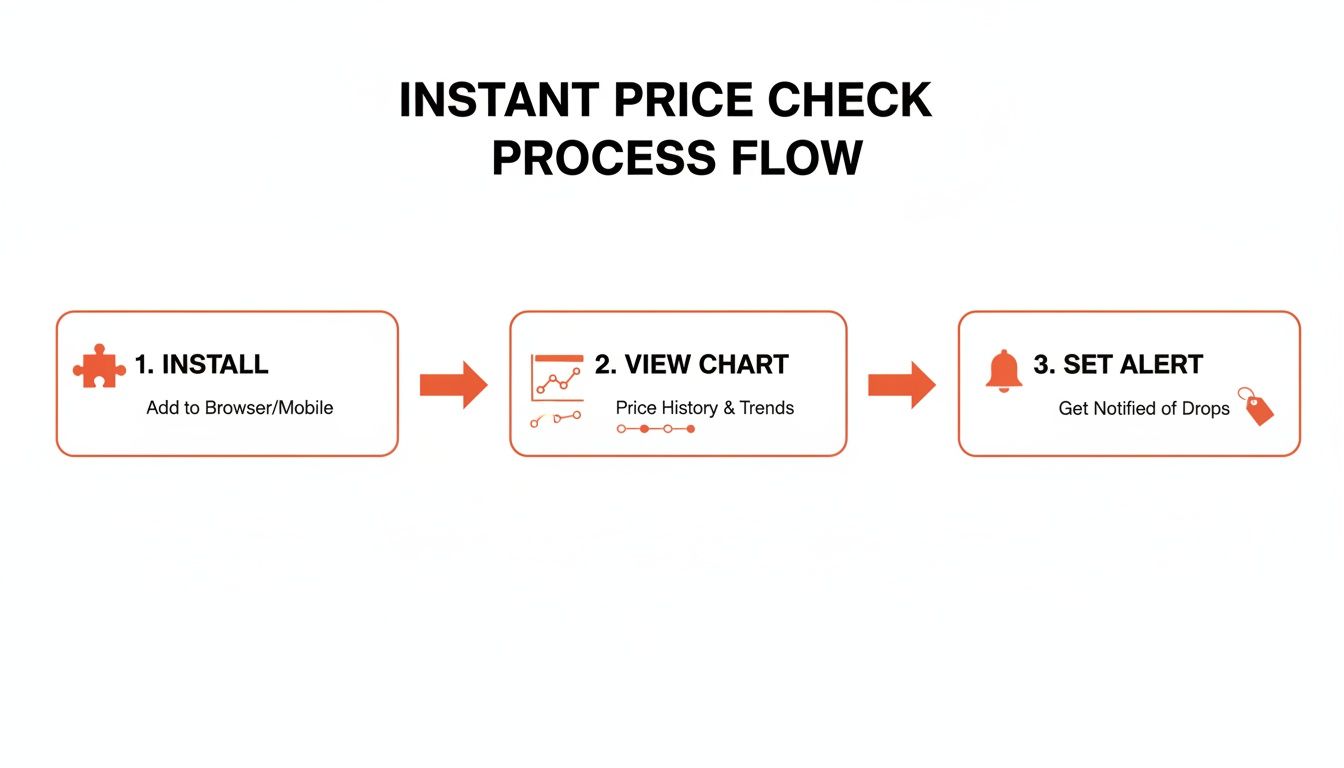
The process is straightforward: install the tool, check the history, and set up alerts to act on price changes the moment they happen.
Setting Up Your First Automated Workflow
Getting started with a tool like Clura is surprisingly easy. The platform is designed to remove technical roadblocks so you can get straight to the data.
Here's a step-by-step example for gathering competitor pricing data:
Launch the Amazon Template: Start with a prebuilt template made for Amazon to save time.
Define Your Scope: Paste the URL of an Amazon search results page or a category you want to monitor.
Run the AI Agent: With one click, the agent gets to work, navigating pages and collecting data from every product listing.
Export Your Data: Once finished, all the information is in a perfectly organized table. Download it as a CSV and open it in Excel or Google Sheets.
This isn't just about saving time. It’s about unlocking a level of market intelligence that was previously impossible to get. You can spot market-wide trends, pinpoint repricing opportunities, and get a granular view of your competitors' strategies.
Understanding Price History on Amazon Through Data
Amazon’s own pricing is a masterclass in market dynamics. The Kindle e-reader launched in 2007 at a hefty $399. Within months, the price dropped to $259, and by 2014, it hit an incredible $69—an 83% decline designed to dominate the market.
It worked. The strategy secured Amazon a 75% share of the US e-book market. Even today, the latest Kindle regularly drops from $159.99 to $99.99 during sales. By collecting this data at scale, you can uncover these long-term strategic plays. Explore more real-world product price tracking use cases to see what's possible.
Key Data Points to Collect for Deeper Analysis
When you automate scraping, you can grab much more than just the current price. Building a rich dataset is how you find game-changing insights.
Here are the essentials to capture:
Product Title: To identify the item.
ASIN (Amazon Standard Identification Number): A unique ID crucial for accurate tracking.
Current Price: The live price of the item.
List Price: The original price to calculate the real discount.
Seller Name: A must-have for tracking competitors.
Customer Rating: For a quick quality check.
Number of Reviews: A great proxy for product popularity.
With this data, your analysis can become much more sophisticated. You could correlate a price drop with a spike in reviews to measure a sale's impact or track how different sellers price the same ASIN. With a powerful AI agent like Clura, gathering this data becomes almost effortless.
Turning Raw Price Data Into Strategic Insights
You've collected a pile of price data. Now what? Raw numbers aren't worth much on their own. The magic begins when you translate that data into a competitive edge. This is where you move past simple tracking and start making smart, data-driven decisions.
With a clean, structured dataset from an automated tool like Clura, the guesswork is gone. You're not just looking at prices; you're analyzing patterns. This is how you catch trends before everyone else and turn historical information into a powerful predictive tool.
Identify Powerful Seasonal Trends
Ever notice how grill prices take a nosedive after summer? Or how exercise bikes get cheaper after New Year's resolutions fade? These are classic seasonal trends, and your collected price history on Amazon makes them glaringly obvious.
By plotting price data over a full year, you can see the recurring peaks and valleys. This is your roadmap for pinpointing the best times to buy or sell.
For Shoppers: You can enter sales events like Prime Day or Black Friday with confidence. You'll know how low a product’s price is likely to drop because you’ve seen what it did last year.
For Sellers: Understanding seasonality is an inventory game-changer. It tells you when to stock up before demand spikes and when to mark down items during the slow season.
This kind of insight shifts your strategy from reactive to proactive. You’re no longer just keeping up with the market—you’re one step ahead of it.
Find and Capitalize on Repricing Opportunities
For Amazon sellers, repricing is a matter of survival. The data you've gathered is a goldmine for understanding what your competition is doing. By analyzing their pricing history, you can decode their patterns and find your opening to win the Buy Box.
Keep an eye out for these signals in your data:
Price Elasticity: How much does a competitor's sales rank change when they tweak their price? This shows how sensitive shoppers are to price changes.
Pricing Thresholds: Does a rival never drop their price below a certain point? That could be a clue about their cost, giving you a clear floor to beat.
Response Times: How fast do they react when you change your price? Knowing this helps you outmaneuver them.
With a clean dataset, you can run this analysis in minutes. If your data is a little messy, it's worth learning how to normalize data in Excel to get it ready for serious analysis.
Verify If a "Deal" Is a Real Bargain
Amazon loves to plaster "deal" banners everywhere, but not all discounts are what they seem. A "20% off" tag looks great, but it’s meaningless without historical context. Your price history data is a personal truth detector.
Before you buy, a quick glance at your data will show you the product's all-time low price. An item might be on sale for $80, down from $100. Sounds decent, right? But if its historical low is $65, you can confidently wait for a better deal.
This simple check is one of the most powerful ways to use price history. It’s your best defense against buyer's remorse and ensures you only buy when the value is truly exceptional.
To get the full story, look beyond the price tag. Detailed ASIN reports can offer deeper insights into a product's performance. By looking at the complete picture—price history, shipping costs, and seller reputation—you'll make informed, profitable decisions every time.
Your Top Amazon Price Tracking Questions, Answered
Jumping into Amazon price tracking can feel like unlocking a superpower. But with great power comes a few questions. Let's clear up some common concerns so you can get started with confidence.
Is It Okay to Track Amazon Prices?
Yes, absolutely! Tracking the public price history of products on Amazon is 100% legitimate. It's a go-to strategy for both shoppers and sellers. Tools like Keepa, CamelCamelCamel, and automated platforms like Clura simply organize publicly available information to help you.
The key is to use established, well-behaved tools. They gather data responsibly without violating Amazon's Terms of Service by overwhelming their servers.
How Far Back Does the Price History Go?
This depends on the tool. The good news is that for many products, you can see a surprisingly long history, sometimes stretching back years.
Browser Extensions (Keepa/CamelCamelCamel): These tools often have data going back to a product's initial listing. This is fantastic for spotting seasonal trends and identifying the true "all-time low" price.
Automated Scraping Tools: When you set up your own tracker, the clock starts when you begin. Your price history begins from the moment you hit "go," perfect for creating a custom dataset for specific items.
A price drop only feels like a deal when you have context. Knowing a product’s price history is what separates a good price from a great one.
Can I Track Prices on International Amazon Sites?
You bet! This is a great strategy for uncovering hidden deals or doing global market research. The best tracking tools aren't limited to the US site.
Most popular extensions have a simple dropdown that lets you switch between different Amazon marketplaces, like Amazon.ca (Canada), Amazon.co.uk (United Kingdom), or Amazon.de (Germany). This feature gives you a single, powerful view of the price history on Amazon across the world.
How Often Should I Check Prices?
If you're shopping for yourself, don't check manually. It's a waste of time. Set up a price alert and let the tool email you when your item hits your target price.
For e-commerce professionals, it's a different ballgame. In competitive categories like electronics, prices can fluctuate hourly. Daily checks are necessary to stay ahead. This is where automation is your best friend—it's the only practical way to get a constant stream of data to fuel your repricing strategy.
Ready to stop guessing and start analyzing? Clura's prebuilt templates make it easy to automate your Amazon price monitoring and turn raw data into a real competitive advantage. Explore prebuilt templates.
