Discover how data entry automation transforms businesses by eliminating tedious tasks. Our guide covers workflows, ROI, and AI tools that boost efficiency.
Let's be real—manual data entry is a grind. It’s tedious, mind-numbing work that eats up hours of your day and stops your team from focusing on what actually moves the needle. But what if you could reclaim that time, eliminate costly errors, and supercharge your team's productivity? That's where data entry automation comes in, and it's a complete game-changer.
This guide will show you how to swap repetitive tasks for streamlined, intelligent workflows. Get ready to see how modern AI tools can help you collect web data, organize leads, and build a more efficient business.
Why Manual Data Entry Is Holding You Back
If you run a business, you know the pain of manual work. Copying customer info, typing out invoice details, and organizing leads are all necessary evils. But they’re slow, boring, and surprisingly expensive. The real cost isn’t just the hours logged; it’s the lost opportunity.

Every minute your team spends on manual data entry is a minute they aren't spending on strategy, customer relationships, or creative problem-solving—the very things that drive growth.
The Hidden Cost of Human Error
Here’s the scary part: people make mistakes. Even the most careful employee will eventually make a typo. Studies show that manual data entry has an error rate between 1% and 4%. That might sound small, but it adds up fast. A single misplaced decimal can wreck a financial report, a wrong address can lose a shipment, and a mistyped email can lose a hot lead forever.
These aren't just minor slip-ups; they're costly mistakes that can damage your bottom line and your reputation.
Data entry automation isn’t about replacing people. It’s about freeing them from robotic tasks so they can focus on work that requires a human touch.
Why You Can't Scale Manually
As your business grows, the data entry problem gets exponentially worse. You can't keep up with more orders, leads, and invoices by simply working harder. Hiring more people is a temporary fix—it’s expensive, training takes time, and more hands often lead to more inconsistencies.
This is exactly where data entry automation becomes essential. It gives you a scalable way to handle a flood of new information with incredible speed and near-perfect accuracy. Let’s explore how AI-powered tools can turn your clunky workflows into a smooth, automated engine for growth.
What Exactly Is Data Entry Automation?
Imagine a digital assistant who works 24/7, never gets tired, and never makes a typo. That’s data entry automation in a nutshell. It’s the technology that takes over repetitive data tasks, freeing up your team to focus on work that truly matters.
Instead of a person manually copying information from a PDF invoice into a spreadsheet, automation uses a powerful suite of tools to do it instantly. You're essentially teaching a computer to recognize an invoice number, identify a customer name, or extract an address and place it exactly where it belongs in your CRM or accounting software.
This isn't just about moving data from point A to point B. It’s about redesigning your workflows to be smarter, faster, and more efficient.
The Technology Behind the Magic
So, how does this actually work? It’s not a single tool but a clever combination of technologies working together. Think of it as a high-tech assembly line for your data.
Here are the key players:
Optical Character Recognition (OCR): This is the “eyes” of the operation. OCR scans documents like PDFs, receipts, or images and converts the text into digital data a computer can read.
Artificial Intelligence (AI) and Machine Learning (ML): This is the “brain.” AI algorithms learn to identify patterns, understand context, and get smarter with every task they perform.
Natural Language Processing (NLP): A specialized part of AI, NLP helps the system understand unstructured text, like an email or a customer review. It can pull out key details like names, dates, or even sentiment.
Together, these technologies read, understand, and transfer data with a level of accuracy that’s impossible to achieve manually.
From Manual Grind to Automated Flow
Let's use an analogy. Imagine your job is to create a digital catalog of every book in a massive library. Manually, you'd have to pick up each book, read the cover, and type the title and author into a spreadsheet. It would take ages, and you’d inevitably make mistakes.
Data entry automation is like having a fleet of tiny robots that can scan every book cover in seconds, read the text perfectly, and populate your entire spreadsheet without a single error.
This is the real power of automation. It elevates your team by taking robotic work off their plate. If you're curious about the specifics of getting started, this guide on how to automate data entry is a great resource. By handing over the grunt work, you empower your team to become data strategists who can focus on growing the business.
The Real-World Benefits of Automating Data Entry
We know what data entry automation is, but let's talk about the why. This isn't just a small process tweak; it's a strategic upgrade that delivers powerful results across your entire company. Making the switch kicks off a chain reaction that improves how you operate, compete, and grow.

It all comes down to three game-changing benefits: achieving flawless data accuracy, boosting team efficiency, and slashing operational costs.
Achieve Near-Perfect Data Accuracy
Humans make mistakes. A manual error rate of 1% to 4% might not sound like much, but it’s a ticking time bomb. One wrong digit can lead to incorrect invoices, lost sales leads, or bad business decisions based on faulty data.
Automation is a superstar here. Automated systems achieve accuracy rates between 99.959% and 99.99%. For every 10,000 records, a person might make 100 to 400 errors. An automated tool? Maybe one. This massive improvement eliminates the costly blunders that drain your resources. You can learn more about how automation enhances data integrity to see the full impact.
When you remove human error from repetitive tasks, you build your business on a foundation of clean, reliable data. This is the bedrock of smarter decisions and sustainable growth.
Skyrocket Your Team’s Efficiency
Think of all the hours your team sinks into manual data entry. It’s a slow grind where output is limited by how many people you have. This creates a bottleneck that only gets worse as your business grows.
Data entry automation blows that bottleneck wide open. A smart workflow can process thousands of documents, leads, or orders in the time it takes a person to handle a small handful. And it runs 24/7.
Here’s what that looks like in the real world:
Faster Turnaround: Invoices get processed in minutes, not days. New leads land in your CRM instantly, ready for follow-up.
Massive Throughput: Your team can handle 10x or even 100x the volume of information without breaking a sweat.
A Smarter Focus: Free up your people to do what they do best—analyzing data, talking to customers, and driving strategy.
Dramatically Reduce Operational Costs
Let's talk money. The ROI on automation is fantastic. The most obvious win is cutting the labor costs tied to manual data entry. You can finally scale your business without constantly hiring more people just to keep up.
But the savings go deeper. You also get to eliminate hidden costs like:
The Cost of Mistakes: No more money wasted fixing shipping errors, correcting financial reports, or chasing down lost revenue.
Recruiting & Training Costs: Avoid the endless cycle of hiring and training for a high-turnover, low-satisfaction job.
Opportunity Costs: When your team focuses on revenue-generating activities instead of typing, they are actively pushing the business forward.
Data entry automation is an investment that pays for itself over and over, making your entire operation leaner, smarter, and more powerful.
How Data Entry Automation Works: A 4-Step Guide
So, how does this process actually work? It’s not magic, though it often feels like it. Let's walk through the four simple steps of a typical data entry automation workflow. This will show you just how practical and powerful it is.
Imagine your sales team needs to build a list of prospects from a business directory website. Doing this by hand is a marathon of copy-and-paste. With automation, it becomes a hands-off sprint.
Step 1: Data Capture
First, the automation needs to collect the raw information. This can happen in a few ways:
Web Scraping: An automation bot visits a specific URL—like a business directory or a competitor's pricing page—and extracts the data you need.
Document Uploads: You can simply upload a batch of files, such as PDF invoices, scanned receipts, or resumes from job applicants.
Email Monitoring: You can set up an automation to watch an inbox. When an email with an invoice arrives, the bot grabs it automatically.
The goal is to feed the machine the raw materials it needs to get started.
Step 2: Data Extraction
Now for the cool part. Once the raw data is captured, the "brain" of the automation kicks in. AI-powered tools use technology like OCR and NLP to intelligently identify and pull out the specific information you need.
For that prospect list, the tool would scan the directory and extract key fields like:
Company Name
Contact Person
Job Title
Email Address
Phone Number
It understands context, so it knows the difference between a phone number and a zip code. Want to learn more? Our guide on how to extract data from websites is a great place to start.
Step 3: Data Validation
Raw data is often messy. It can have typos, formatting issues, or missing information. The validation step is the workflow's quality control checkpoint. It cleans, standardizes, and polishes the data to ensure it's accurate and ready to use.
This is what separates a basic script from an intelligent workflow. Validation ensures you’re not just automating mistakes faster.
During this stage, the system can:
Standardize Formats: Ensure all dates, phone numbers, and emails follow a consistent format.
Check for Completeness: Flag any records that are missing critical information, like a contact name.
Remove Duplicates: Automatically detect and merge duplicate entries to keep your database clean.
Step 4: Data Export
You're at the finish line! The data has been captured, extracted, and cleaned. Now, it’s time to send it where it needs to go. This final step delivers the structured data directly into the business tools you use every day.
The clean data can be sent automatically to:
A CSV or Excel file for your team.
Your CRM, like Salesforce or HubSpot.
Your accounting software, like QuickBooks.
Your email marketing platform, like Mailchimp.
This completes the loop. In minutes, a task that used to take hours is done—perfectly.
Manual vs. Automated: A Quick Comparison
The table below shows the stark difference between a manual process and an automated one.
Process Step | Manual Data Entry | Automated Data Entry |
|---|---|---|
Data Source | User navigates websites or opens files one by one. | Bot automatically connects to URLs or ingests file batches. |
Data Extraction | Human physically copies information and pastes it. | AI tools intelligently identify and extract specific data fields. |
Data Validation | Relies on slow, error-prone human proofreading. | System runs automated checks for formatting and duplicates. |
Data Entry | User manually types data into the target system. | Data is automatically pushed to its destination (CRM, etc.). |
Speed | Slow; measured in entries per hour. | Fast; measured in thousands of entries per minute. |
Accuracy | Prone to human error (up to 4% error rate). | Near 100% accuracy with rules-based validation. |
Cost | High ongoing labor costs. | Low, predictable software subscription costs. |
As you can see, automation doesn't just speed things up; it transforms the entire process, making it more reliable, scalable, and cost-effective.
Practical Use Cases for Data Entry Automation
Theory is great, but let's look at how automation solves real-world problems. From e-commerce stores to busy sales teams, this technology is changing how businesses operate. Here are a few practical examples of data entry automation in action.
E-commerce: Monitor Competitor Pricing
In e-commerce, staying competitive is everything. Manually tracking competitor prices is impossible. An automated workflow can monitor hundreds of product pages in real-time, extracting pricing and stock levels.
This data flows into a dashboard, giving you an instant view of the market. With this information, you can:
Adjust Prices Dynamically: Stay competitive without hurting your profit margins.
Make Smarter Inventory Decisions: Spot trends and know what to stock up on.
Identify Market Gaps: Find opportunities where competitors are out of stock.
You can even use a pre-built tool like an Amazon product listings scraper to get started quickly.
Sales: Generate High-Quality Leads
Sales teams need a steady flow of quality leads, but building those lists is a grind. Manually searching directories and websites for contact information is a huge time sink.
With data entry automation, you can deploy an AI agent to crawl targeted websites and extract names, job titles, emails, and phone numbers. The data is then automatically validated and sent directly to your CRM. Imagine your sales team getting hundreds of fresh, qualified leads every single day—without lifting a finger.
This simple, four-step process is what powers these workflows.
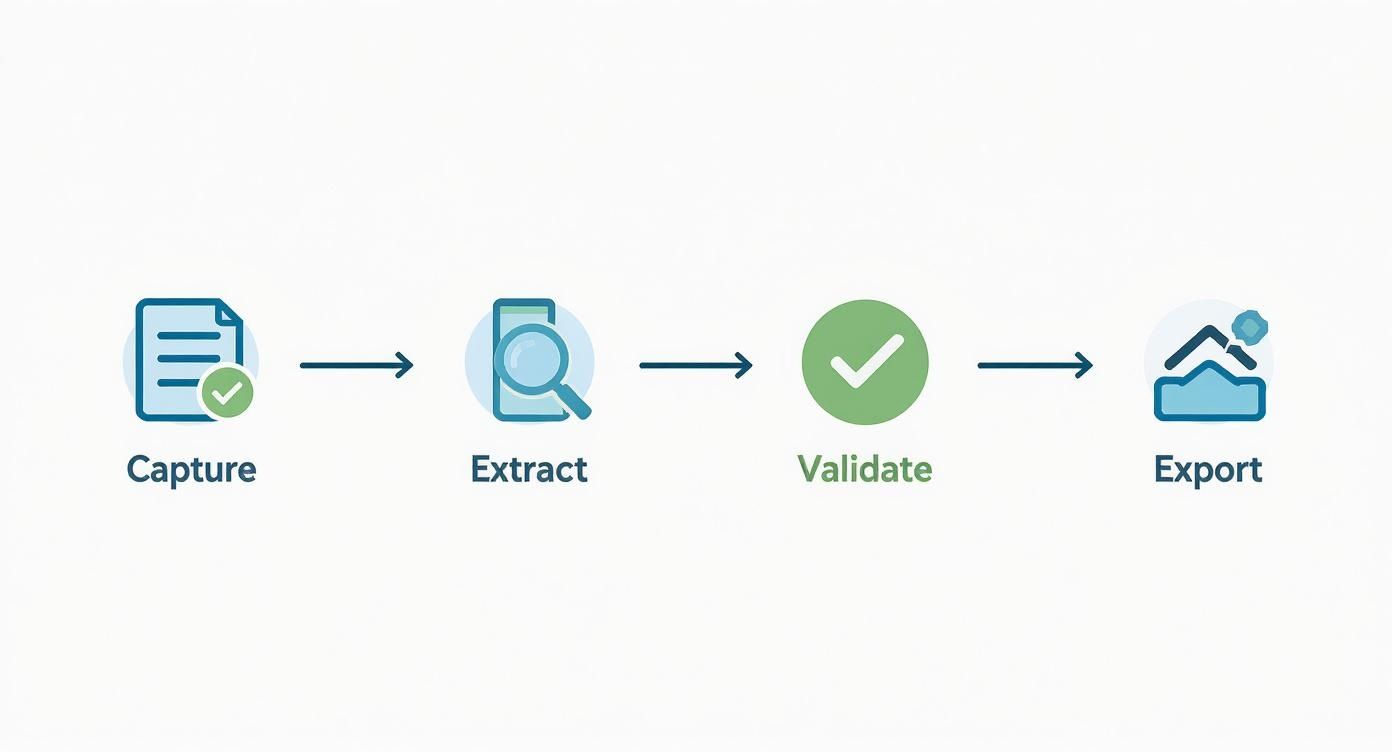
It’s this seamless journey from raw information to actionable insight that makes automation so powerful.
HR: Streamline Your Recruiting Workflow
Hiring top talent is competitive, and speed is crucial. Recruiters are often buried under a mountain of resumes, making it hard to give each one proper attention. Automation can instantly scan resumes in any format (PDF, Word, etc.) and extract key information.
The system can identify and tag details like:
Years of experience
Specific skills and certifications
Education history
Previous employers
This allows recruiters to filter and find the best candidates in seconds. The result? Faster hiring, better matches, and a huge competitive edge. For more inspiration, check out these Top Business Process Automation Examples to see how others are winning with automation.
The market reflects this shift. The global data entry services market was valued at USD 5.2 billion in 2024 and is projected to hit USD 12.8 billion by 2033. This growth shows just how essential smart data management has become.
How to Get Started with Data Entry Automation
Ready to jump in? Launching your first data entry automation project is easier than you think. The key is to start small, get a quick win, and build momentum from there. Here’s a simple, step-by-step guide to get you started.
https://www.youtube.com/embed/KSOxkhWs2Ic
Forget trying to automate everything at once. Your first project should be a focused effort that delivers immediate, obvious value.
Step 1: Find the Perfect Task to Automate
Before you look at any tools, find the right job for your first automation. The best candidates are the tedious, repetitive tasks that are currently slowing your team down.
Look for processes that are:
High-Volume: Tasks that happen over and over, every single day, like processing new leads or updating customer records.
Repetitive: The workflow follows the same exact steps every time. Think copy, paste, repeat.
Rule-Based: Any decisions involved are simple and logical, with no need for complex human judgment.
A common mistake is trying to automate a messy process. Automate a clean workflow first. If your current process is chaotic, automation will only create faster chaos.
Step 2: Choose the Right Automation Tool
Once you’ve picked your task, it’s time to choose your tool. For your first project, prioritize simplicity and speed. You need a platform that lets you build and experiment easily.
Look for a tool with:
A No-Code Interface: You should be able to build workflows using a simple, visual drag-and-drop editor.
Pre-built Templates: Why start from scratch? Templates for common tasks like lead generation or price monitoring can get you 80% of the way there in minutes.
Easy Integrations: The tool must connect smoothly with the software you already use, like your CRM or spreadsheets.
To help you choose, check out this guide on the best data extraction software to find a tool that fits your goals.
Step 3: Build, Test, and Refine Your Workflow
Now for the fun part. Start by building the basic steps of your workflow. Keep it simple. Then, run it with a small batch of test data to see how it performs.
Your goal isn't perfection on the first try. The goal is to get a working model up and running, then make it better. Test, tweak, and test again.
This cycle of testing and refining is critical. You'll likely find small issues you didn't anticipate, like weird date formats or missing data. Each fix makes your automation stronger and more reliable.
The timing couldn't be better. The business process automation market is projected to grow from USD 13 billion in 2024 to USD 23.9 billion by 2029. Over 80% of businesses are planning to increase their automation investments. You can discover more insights about these automation trends to see why the momentum is so huge.
By following these steps, you can launch a project that saves time, cuts costs, and proves the power of automation to your entire organization.
Your Data Entry Automation Questions, Answered
Jumping into new technology always brings up questions. That’s a good sign! It means you’re thinking critically about how to get the most value. Here are answers to the most common questions about data entry automation.
Do I Need to Be a Developer to Use This?
Absolutely not. This is one of the biggest myths about automation. Today's best platforms are designed with no-code interfaces, allowing you to build powerful workflows using simple drag-and-drop tools. If you can use a spreadsheet, you have all the technical skills you need to get started. These tools put the power of automation in everyone's hands.
How Secure Is My Data?
Security is a top priority. Reputable automation tools use industry-standard security measures to protect your information.
Look for platforms that offer:
End-to-end encryption to keep your data safe.
Strict access controls so only authorized users can access your workflows.
Compliance with privacy regulations like GDPR and CCPA.
In fact, automation can actually make your data more secure. By reducing manual handling, you minimize the risk of human error and unnecessary exposure of sensitive information.
Think of it this way: a secure automation system is like a digital armored truck for your data. It moves information from point A to point B without any manual detours, reducing the chances of a breach.
Can Automation Handle Messy or Unstructured Data?
Yes! This is where modern AI-powered tools shine. Old automation software struggled with anything that wasn't in a perfect table. But today’s systems use AI like Natural Language Processing (NLP) to read and understand messy documents, just like a person would.
This means they can intelligently extract key information from:
PDF invoices with different layouts.
Customer emails and support tickets.
Scanned receipts and business cards.
The AI is smart enough to find the data you need—like an invoice number or company name—no matter where it appears on the page. It turns chaos into clean, structured data you can actually use.
Ready to stop the grind and start automating? With modern tools, you can build your first workflow in minutes and see an immediate impact.
