
Unlock e-commerce intelligence. Learn how to scrape Google Shopping for pricing, competitor data, and market trends with our ultimate how-to guide.
Want a serious competitive advantage? The secret is hiding in plain sight on Google Shopping. It’s not just a digital mall; it’s a massive, real-time database packed with product prices, stock levels, and competitor strategies. For any e-commerce brand, learning how to tap into this data is like finding a treasure map.
When you scrape Google Shopping, you’re collecting public data—product names, prices, and seller details—that’s crucial for smart market analysis. This isn't about just grabbing numbers; it’s about turning raw data into a real-time playbook that shows you what your competitors are doing and what the market truly wants.
Why Scrape Google Shopping for E-commerce Intelligence?
Think of Google Shopping as a goldmine of e-commerce intelligence. By learning how to extract this data, you're not just gaining a technical skill. You're building a strategic advantage that lets you shift from guessing games to data-backed decisions. It’s how you get that unbeatable edge.

Fuel Your Growth with Actionable Data
The numbers are mind-boggling. We're talking about over 1 billion products listed on a platform that handles around 100 billion searches every single month. With shopping clicks on Google Shopping jumping by a massive 200% in recent years, it’s undeniably where today's shoppers make their decisions.
So, what can you actually do with all this data? Plenty.
Nail Your Pricing: See exactly how your competitors are pricing their products. You can then adjust your own strategy to stay competitive without hurting your profit margins.
Keep an Eye on Rivals: Get alerts on new product launches, promotions, and even when a competitor's stock is running low. This lets you anticipate their next move.
Spot Hot Trends: What's flying off the virtual shelves? By analyzing search data and popular products, you can find the next big thing or an underserved niche.
Perfect Your Product Listings: Dive into competitor product descriptions, images, and reviews to see what works. You'll find golden nuggets on how to position your own products better.
See the Impact with Real-World Examples
Let's make this practical. Imagine you run an online electronics store. You could scrape Google Shopping daily to watch the price of a hot new smartphone. The moment a key competitor slashes their price by 10%, you'll know. You can instantly counter with a price match or a bundle deal to keep your customers loyal.
Or, say you're a fashion brand planning a new sneaker line. By scraping the results for "vegan leather sneakers," you can instantly see the top players, their price points, and what customers are saying in the reviews. This insight is invaluable, shaping everything from your initial design to your final marketing push. Staying on top of the market really boils down to monitoring competitor prices and product data effectively.
The ability to automatically collect and analyze competitor data is a game-changer. It transforms market research from a quarterly task into a continuous, real-time feedback loop that drives smarter business decisions.
Ultimately, scraping Google Shopping gives your team the power to make choices based on solid evidence, not just gut feelings.
How to Choose Your Google Shopping Scraping Method
So, you’re ready to scrape Google Shopping. Awesome. Right now, you're at a crossroads. One path is all about user-friendly browser automation, and the other is the more technical, code-driven world of scraping APIs. Both get you the data you crave, but they’re built for completely different people and projects.
Getting this choice right from the start will save you a world of headaches. It really boils down to matching the tool to your team's skills and what you’re trying to achieve. Let's dig into these two powerhouse approaches so you can pick the one that feels right for you.
The No-Code Route with Browser Automation
Picture this: you point at the data you want on a website, and a smart assistant just grabs it for you. That’s the beauty of browser automation in a nutshell. Tools like Clura work right inside your browser, letting you interact with Google Shopping pages just like you normally would.
You simply click on the product titles, prices, and seller names you need, and the agent learns what to do. It’s smart enough to handle tricky stuff like clicking through multiple pages or dealing with pop-ups—all without you ever touching a line of code.
This approach is a total game-changer for:
Marketers who need to monitor competitor campaigns without waiting for a developer.
E-commerce analysts who want to quickly pull pricing data into a spreadsheet for number-crunching.
Founders and small business owners who juggle a million things and just need results, fast.
The biggest win here? It’s incredibly accessible. If you can browse the web, you can use a browser automation tool to scrape data. It opens up the world of data collection, putting powerful insights directly into the hands of the people who need them most.
The Developer-Focused Path with Scraping APIs
On the other side, we have scraping APIs. This is the playground for developers and data scientists who live and breathe code and demand ultimate control and scale. Instead of a visual interface, you're sending programmatic requests to an API.
Think of it as placing a direct, custom order for data. You’ll write a script, maybe in Python or JavaScript, that tells the API precisely what you want—like, "fetch all prices for 'Nike Air Force 1' in New York." The API does the heavy lifting, gathers the data, and sends it back in a neat, structured format like JSON.
This method gives you unbelievable flexibility. You can pipe the data directly into your own apps, databases, or complex analytics workflows. It's the go-to for massive operations that need to scrape thousands of pages on a tight schedule. The catch? It demands real technical expertise.
The choice between automation and APIs isn't about which is "better"—it's about which is better for you. Your technical skills, project timeline, and the scale of your data needs should be your guide.
Browser Automation vs Scraping API: A Quick Comparison
To really spell it out, let's put these two methods head-to-head. A simple table often makes the decision crystal clear.
Feature | Browser Automation (e.g., Clura) | Scraping API |
|---|---|---|
Skill Level | Beginner-friendly. No coding required. | Developer-focused. Requires programming skills. |
Setup Time | Minutes. Install and start clicking. | Hours to days. Involves coding, testing, and setup. |
Flexibility | High. Easily adapts to visual changes on the site. | Very High. Total control over requests and data flow. |
Best For | Quick analysis, non-technical teams, market research. | Large-scale data pipelines, custom integrations. |
Example | A marketer using a template to check competitor prices. | A developer building a real-time price monitoring dashboard. |
At the end of the day, both paths lead to the same destination: valuable e-commerce intelligence. If your goal is to get clean, structured data quickly without a steep learning curve, a browser-based agent is your new best friend. For those who need to build custom, large-scale data engines, an API provides all the raw power you'll need.
And if you want to see just how easy automation can be, you can even take a shortcut with a pre-built solution like our Google Search Results Scraper template.
How to Scrape Google Shopping with Code: The Technical Deep Dive
Alright, let's roll up our sleeves and peek under the hood. If you're curious about what really goes into building a scraper from scratch, you're in the right place. We're about to dive into the nuts and bolts of manually scripting a solution to scrape Google Shopping. This is a great way to grasp the core mechanics and truly appreciate why no-code tools are so slick.
Think of this as a guided tour for the technically adventurous. We'll walk through everything from finding web page elements to outsmarting Google's dynamic, ever-changing layout.
Before we start, it’s helpful to see the two main paths you can take. This flow diagram breaks it down: you can either go with a visual, automated tool or get your hands dirty with a code-driven, API-based method.
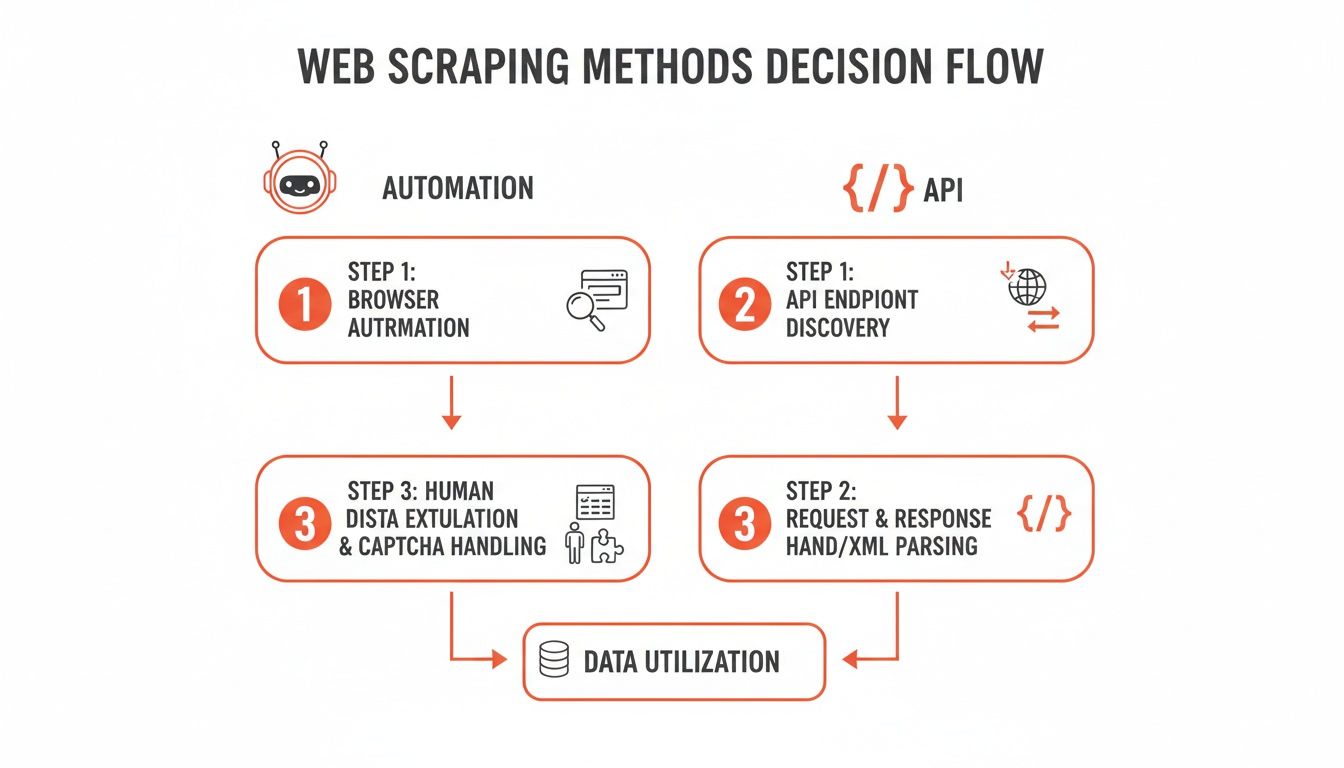
As you can see, your choice really boils down to your technical skills and how big your project is. Automation is all about speed and simplicity, while coding gives you raw power and total control.
Step 1: Pinpoint Your Data Targets on the Page
First things first: before you write a single line of code, you have to play detective. The mission is to find the exact HTML elements that contain the data you're after. Your best friend here is your browser's built-in Developer Tools—just right-click anywhere on the page and hit "Inspect."
Once you're inspecting a Google Shopping page, you’ll see a sea of HTML code. Don't worry! Your job is to find the specific tags and class names that pinpoint the data you need.
Product Title: Look for header tags like
<h3>or<h4>. They usually have a consistent class name that Google uses for all product titles on the page.Price Information: Prices are almost always wrapped in a
<span>tag. Hunt for a unique class name that signals "price."Seller Name: The merchant’s name is usually right next to the price, often as a link. Again, track it down by its class.
Product ID: This one can be tricky, but sometimes you can find a unique ID tucked away in an element's attributes, like
data-id.
Once you've identified these CSS selectors, you’ve essentially created a treasure map for your script. You're telling your code, "Go find every element with this exact address and grab what's inside."
Step 2: Tame Dynamic Content and Pagination
Now for the fun part. Google Shopping is dynamic; it doesn't load everything at once. As you scroll, more products magically appear. This is JavaScript doing its thing. A basic script that only fetches the initial HTML will miss tons of data.
To get around this, your script needs to act more human. That means programmatically scrolling down the page to trigger the lazy-loading effect. Tools like Selenium or Puppeteer are essential here. They can pilot a real browser, execute the necessary JavaScript, and wait for new products to show up before grabbing them.
Then there's pagination—that "Next Page" button. Your script has to be smart enough to handle it.
First, scrape all the products on the current page.
Next, find the "Next Page" button using its selector.
Then, "click" it to load the next batch of results.
Finally, repeat this loop until you run out of pages.
This cycle is the key to gathering a complete dataset from any multi-page site.
Step 3: Outsmart Anti-Scraping Measures
Let's be real: Google is a giant. It has incredibly sophisticated systems designed to spot and block bots. If you fire off too many requests too quickly from one IP address, you'll hit a wall of CAPTCHAs and temporary blocks.
This is where proxies become your secret weapon. A proxy server acts as a middleman, routing your requests through different IP addresses. Suddenly, your scraper looks less like a single, aggressive bot and more like dozens of different users from around the world. The chance of getting blocked plummets.
I'll say it flat out: using a rotating proxy service is non-negotiable for any serious scraping project. It's the difference between grabbing a handful of records and successfully building a massive dataset.
Another hurdle is headless browser detection. Websites have ways to detect browsers that run without a visual interface. More advanced setups use clever tricks to make their headless browsers look human, like faking mouse movements or using realistic browser fingerprints. This guide on how to scrape Google Search Results has some great techniques that apply here, too.
Step 4: Extract and Structure Your Data
You've done it! Your script has navigated the page, found the right elements, and pulled the raw data. The last step is to bring order to the chaos. For each product, you’ll extract the text from the selectors you found earlier.
The end goal is a perfectly structured dataset, usually a CSV file or a JSON object. Each row in your spreadsheet will represent a single product, with clean columns for each data point:
Product Title | Price | Seller | Availability | Product ID |
|---|---|---|---|---|
Smartwatch Pro X | $199.99 | TechGiant | In Stock | 847291 |
Wireless Earbuds | $79.50 | AudioVerse | In Stock | 563302 |
4K Ultra HD TV | $450.00 | VisionElec | Limited Stock | 910234 |
After you've pulled the data, a little data cleaning is always in order. You'll need to strip currency symbols from prices, trim extra whitespace from titles, and deduplicate your records. This post-processing step is essential for a clean, accurate final dataset.
Building a scraper by hand is a tough but incredibly rewarding challenge. It gives you a deep appreciation for how web data extraction works and makes you realize just how impressive modern automation tools really are.
How to Scrape Google Shopping in Minutes (The Easy Way)
Let's be honest, getting that rich product data can be a major headache. But what if you could skip all the code, proxy juggling, and debugging sessions? That's where smart automation comes in. You can actually scrape Google Shopping with just a few clicks, and I’m going to show you exactly how.
We'll use Clura's AI-powered browser agent to transform this tedious chore into a simple, automated workflow. The result? A perfectly clean CSV file, packed with data and ready for analysis, all in a fraction of the time.
Step 1: Get Up and Running in Clicks
One of the best things about using a browser-based agent is how simple it is to get started. First, just add the Clura extension to your Chrome browser. Once that's done, head over to Google Shopping and search for whatever you're interested in—say, "wireless noise-canceling headphones."
From this point on, things feel incredibly intuitive. Forget about digging through HTML or figuring out how to code for pagination. You can just launch a pre-built template made specifically for Google Shopping and let it do all the heavy lifting for you.
Here’s what you'll see right inside your browser when you're ready to roll.
The clean dashboard makes it a breeze to pick a template or even build a custom agent on the fly, removing all the usual complexity from data collection.
Step 2: Use a Pre-Built Template
This is where you really see the speed of a no-code tool. Instead of burning hours—or even days—building a scraper from the ground up, you can use a workflow that’s already been tested and perfected.
With Clura, you just activate the Google Shopping template. The AI agent instantly gets to work, intelligently identifying and grabbing all the crucial data on the page.
Product Titles: It pulls the full name of every single product listed.
Pricing: The current price for each item is extracted cleanly.
Seller Info: It captures the merchant's name for each listing.
Product Links: You get the direct URL to every product page.
The agent is also smart enough to handle those tricky infinite scrolling pages without any extra help. It just keeps scrolling down, exactly like a person would, to load and capture every product in the search results. No loops to program, no special commands to write—it just works.
Here’s the real kicker: an AI-powered agent adapts. Google changes its website layout all the time, and when it does, traditional scripts break. Clura’s AI can often understand the new structure on its own and keep on collecting data without missing a beat.
Step 3: Turn Data into Powerful Market Insights
The information you pull from Google Shopping is far more than a simple product list; it's a strategic goldmine. Google Shopping Ads are a massive engine for e-commerce, driving 85.3% of all clicks on Google Ads campaigns and consuming 76% of retail search ad spend. Those numbers point to a huge opportunity for brands that can analyze this data effectively. You can dive deeper into these Google Shopping Ads statistics from bind.media.
By scraping this info, you can start dissecting your competitors' ad strategies, monitoring their prices in real-time, and finding gaps in the market you can jump on.
Once the agent finishes, you can export everything into a clean, structured CSV file with a single click. This file is perfectly formatted and ready to drop right into Google Sheets, Excel, or whatever analytics tool you prefer. No more painful data cleaning or manual reformatting.
That’s the beauty of browser automation. It takes a complex, technical job and makes it accessible to everyone on your team, from marketers to sales reps.
A Guide to Smart and Ethical Scraping
Gathering data is a game-changer, but you have to play it right. When you decide to scrape Google Shopping, think of yourself as a guest in their house. The goal is to get the information you need without making a mess or getting kicked out. A few simple rules will keep your data collection effective, ethical, and running for the long haul.

This isn’t just about being nice; it’s about protecting your project and respecting the platform that’s giving you all this incredible market insight.
Be a "Good Bot"
The first rule of scraping club: don't hammer the servers. Imagine your script firing off hundreds of requests a second—it’s like a digital mob trying to get through a single door. You’ll slow things down for everyone else and, frankly, it’s a surefire way to get your IP address banned.
So, what do you do? Be a "good bot." Throttle your request speed. Introduce deliberate delays between your requests. Even a couple of seconds can make all the difference. This makes your scraper act more like a human just browsing around, which is exactly what you want.
Respect the Terms of Service
Every website has a Terms of Service (ToS) page, and Google is no exception. Scraping publicly available data is generally legal in many places, but automating the process might step on the toes of a site's specific rules. It's always a good idea to actually read them.
You don't need a law degree, but a quick scan of the ToS shows you're doing your homework. It helps you understand the playing field and make smarter, more informed decisions about your scraping projects.
A solid rule to live by is to only collect data that's publicly visible. If you don't need to log in to see it, you're usually in a much safer zone. Steer clear of personal info, copyrighted material, or anything locked behind a paywall.
Your Data Is Only as Good as Its Quality
Getting the data is just the beginning. The real magic happens when you clean it up. Raw, scraped data is often messy, and it needs some polishing before it can give you those juicy insights you're after.
Here’s a quick checklist to turn that raw data into a reliable asset:
Ditch the Duplicates: It's common for Google Shopping to list the same product more than once. Run a deduplication pass to ensure your analysis isn't skewed.
Standardize Everything: Consistency is key. Clean things up by standardizing your data formats. Strip currency symbols from prices so they’re just numbers, and trim any extra whitespace from product titles.
Double-Check Your Work: If you can, try to cross-reference mission-critical data with another source. This is especially important if you’re using this information to make big business decisions.
By weaving these practices into your workflow, you’re not just scraping data. You're building a trustworthy, reliable foundation for your market intelligence that’s both powerful and principled.
Your Top Google Shopping Scraping Questions Answered
Jumping into Google Shopping scraping is exciting, but it brings up a few big questions. You want to make sure you’re collecting data the right way, without stepping on any toes or wasting your time. Let's cut through the noise and tackle the most common questions.
Is It Legal to Scrape Google Shopping?
This is always the first question, and for good reason. The short answer? Yes, scraping publicly available data is generally considered legal in most places, including the US and Europe. If you can see the information in your browser without logging in, it's typically fair game.
But it comes with some responsibility.
Check the Terms of Service: Google isn't a huge fan of automated access. While the legal precedent is on your side for public data, be aware of their ToS.
No Personal Data: This is a hard line. Stick to product data like prices, seller names, and specs. Stay far away from anything that could be considered personal or copyrighted.
Don't Be a Nuisance: Scrape responsibly. Use a reasonable request rate to avoid hammering their servers and getting blocked. Think of it as being a good neighbor online.
Our take: For any serious commercial project, it's always smart to have a quick chat with a legal expert who understands data privacy laws like GDPR or CCPA. It's a small step that can save you a massive headache later.
How Do I Handle Different Product Variations and Sellers?
You've seen it: one product page on Google Shopping can have dozens of sellers, colors, and sizes. It’s a mess if you're trying to extract clean data. How do you grab the price from "Seller A" for the "Blue, Large" version versus "Seller B" for the "Red, Small" one?
If you're writing a script from scratch, you'd need to build some clever logic to loop through all those nested elements on the page. It's doable, but it’s a pain.
This is where modern scraping tools completely change the game. An AI-powered agent, for example, is built to understand these e-commerce structures right out of the box. It can see the different sellers and variations, allowing you to easily tell it: "Hey, grab the price from every single seller," or, "Just give me the main 'Buy Box' price."
Can I Set This Up to Automatically Track Price Changes?
You bet! In fact, this is where the real magic happens. A one-time data pull is useful, but automated, scheduled scraping is how you build a real competitive edge.
Imagine setting your scraper to run every morning at 8 AM. You could:
Monitor your competitors' pricing adjustments.
Get alerts when a hot product comes back in stock.
Spot emerging market trends before anyone else.
With a custom Python script, you might use something like cron jobs on a server to kick it off. But with a browser-based tool like Clura, scheduling is usually just a few clicks. The tool runs on its own, and each export gets a timestamp. Before you know it, you've built a rich historical dataset perfect for visualizing price elasticity and market shifts.
Get Started with Google Shopping Scraping
Scraping Google Shopping gives you a powerful lens into your market, revealing competitor strategies, pricing trends, and new opportunities. Whether you choose to write your own code or use a no-code automation tool, the insights you can gather are a game-changer for any e-commerce business.
By following the steps and best practices in this guide, you can start turning public web data into a real competitive advantage.
Ready to stop wondering and start gathering intel? Clura makes it incredibly simple to automate data collection from Google Shopping and hundreds of other sites, all without touching a line of code.
Check out the pre-built templates and get your first project running in minutes.
