
Learn how to scrape data from LinkedIn to build targeted lead lists and automate research. Our guide makes LinkedIn data scraping easy, even without code.
You can pull data right from LinkedIn using AI-powered browser scraping tools. These smart tools automatically grab public info from profiles, company pages, and search results, then organize it all into a neat spreadsheet. It’s a game-changer that skips the complex coding, letting sales, recruiting, and marketing teams build lead lists, find top talent, and get a read on the market in record time.
Why LinkedIn Is a Goldmine for Modern Businesses
Let’s be real—LinkedIn isn't just another social media site; it’s the definitive professional database on the planet. For anyone in sales, recruiting, marketing, or research, it's the ecosystem where business gets done. Every profile, job posting, and company update is a nugget of data that can help you make smarter moves.
Trying to copy and paste all that information by hand is a painfully slow grind that just doesn't work when you need to scale. Top teams know this, and they use automation to gain a serious competitive edge. By learning how to scrape data from LinkedIn, you can tap into that same power.
Unlock Actionable Business Insights
Picture turning raw LinkedIn data into clean, structured spreadsheets without touching a single line of code. That’s exactly what modern AI browser agents do. They take a massive technical headache and turn it into a simple, one-click process, opening the door for what your team can accomplish.
Supercharge Your Lead Generation: Quickly build laser-focused lists of your ideal customers, complete with their names, job titles, companies, and locations.
Find Top Talent Faster: Pinpoint qualified candidates by searching for specific skills, experience levels, and industries, creating a dynamic talent pipeline.
Get Deep Market Intelligence: Keep an eye on your competitors' hiring trends, track important industry shifts, and analyze signals of company growth.
In the fast-paced world of B2B sales and recruiting, it’s no surprise that LinkedIn is a top target for data collection. With over 900+ million users, it's an absolute treasure trove of professional profiles and company details. In fact, companies that scrape data from LinkedIn can boost their recruitment efficiency by up to 50%. You can find more details in this list of the most scraped websites.
So, is this even allowed? The short answer is yes—as long as you do it responsibly. The landmark hiQ Labs v. LinkedIn court case confirmed that scraping publicly available data doesn't violate the Computer Fraud and Abuse Act (CFAA).
This gives you a green light to gather public information ethically to grow your business. The secret is using tools that play by the rules and act like a real human, making your data collection both effective and safe. This guide will show you exactly how to get it done right.
Choosing the Right Method to Scrape LinkedIn Data
It’s one thing to know what data you want, but picking the right tool for the job can feel like a huge hurdle. Don't worry, it's not as complicated as it seems. The best way to pull data from LinkedIn really comes down to what you're trying to achieve, your budget, and how much technical skill you have.
Think of it this way: if you just need to grab contact info for a handful of people, you can do it yourself (manual copy-paste). It's free, but it's not going to get you very far, very fast. On the other end, you could build a custom rocket ship (hello, Python scripts!), which is incredibly powerful but requires a team of engineers.
For most of us, there's a much better way that sits right in the middle.
Compare LinkedIn Data Scraping Methods
To help you find your perfect fit, here's a quick comparison of the most common ways people extract data from LinkedIn. This should make it clear which path is right for you.
Method | Ease of Use | Speed | Cost | Best For |
|---|---|---|---|---|
Manual Copy-Paste | Very Easy | Very Slow | Free | Grabbing info from one or two profiles for a one-off need. |
Custom Python Scripts | Very Difficult | Very Fast | Varies | Developers building a highly specific, massive data-gathering operation. |
Official LinkedIn API | Difficult | Fast | High | Huge companies with deep pockets and a formal partnership with LinkedIn. |
AI Browser Extension | Very Easy | Very Fast | Low / Free | Sales pros, recruiters, and marketers who need quality data without the headache. |
As you can see, manual work is a non-starter for building any real list, and custom scripts or the official API are overkill for most business needs. They come with a massive learning curve and price tag.
This is where the real game-changer comes in.
The Sweet Spot: AI-Powered Browser Agents
For the vast majority of us who just want good, clean data without getting a computer science degree, AI-powered browser extensions are the answer. These tools are genius. They plug right into your web browser and let you scrape structured data from any LinkedIn page with just a click.
No coding. No complicated setups. Just point, click, and get your data.
It’s the perfect solution for:
Sales teams who need to build a killer prospect list from a LinkedIn search.
Recruiters hunting for the perfect candidates on company pages.
Marketers trying to get a read on what their competitors are up to.
Here’s the secret: these browser tools act like a human assistant. They work within your own LinkedIn session, navigating and collecting information just like you would—only at lightning speed. This makes them much safer and less likely to get you flagged.
When you're exploring options, you might find a dedicated LinkedIn profile scraper built for exactly what you need, making the process even smoother. Your goal is to find a method that gets you the data you need without the friction so you can focus on what really matters.
A Step-by-Step Guide to Scrape LinkedIn Search Results
Alright, enough theory. Let's get our hands dirty and see just how easy it is to scrape data from LinkedIn. We're going to walk through a real-world scenario from start to finish using a modern AI-powered browser agent.
Imagine you're building a sales pipeline. Your mission: find every "Product Manager" working at a tech company in Austin, Texas. Doing this by hand would take hours. With the right tool, you can have a full list before you finish your coffee.
This guide shows you how to use a browser extension, tell an AI what you want, and get a clean, ready-to-use CSV file. No code, no complicated setups—just fast, actionable data.
Step 1: Set Up Your Browser Agent
First, you'll need to add the AI agent to your browser. This is usually just a quick visit to the Chrome Web Store to install the extension. Once it’s done, a new icon will pop up in your browser's toolbar, ready to go. The beauty of a browser-based tool is that it works right inside your existing LinkedIn session.
This diagram breaks down the different ways you can get data from LinkedIn, showing how no-code tools hit that perfect sweet spot between power and simplicity.
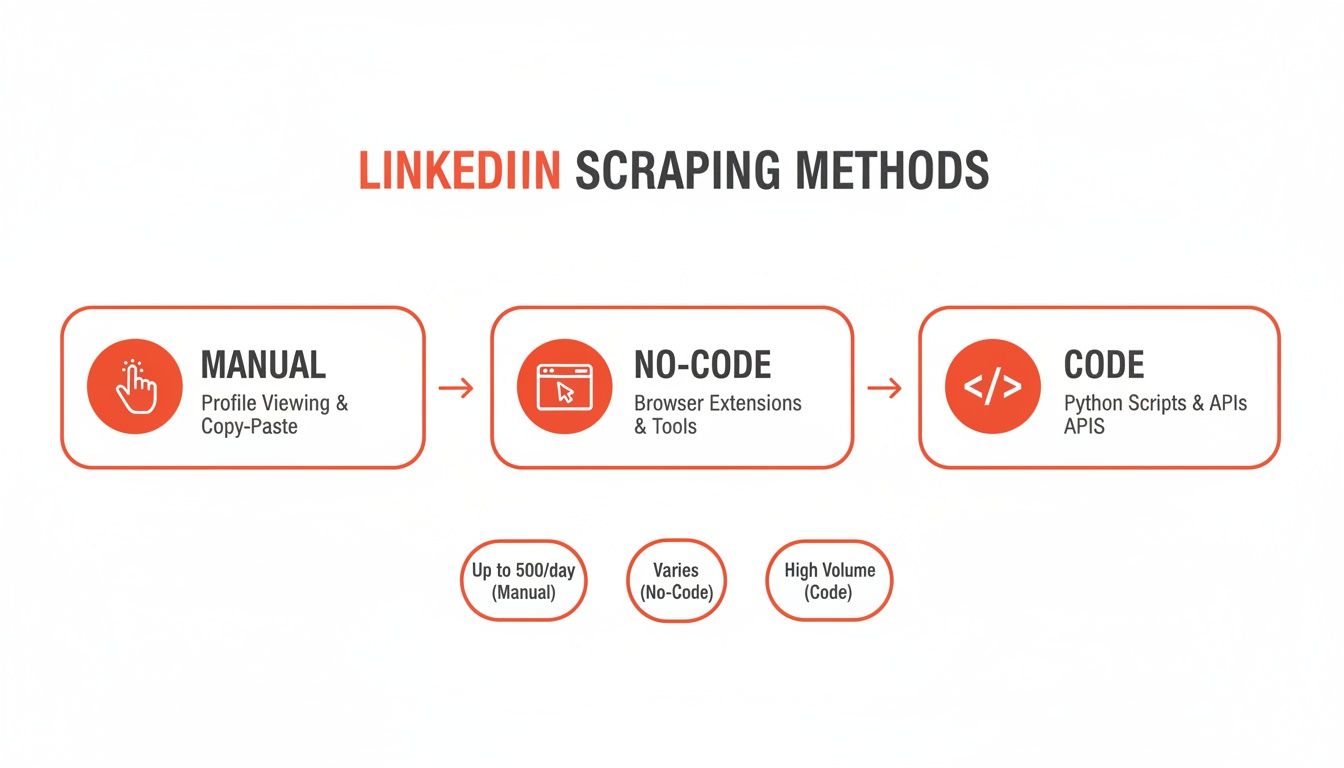
As you can see, manual methods are a grind and coding is a whole different skill set. No-code solutions are built for business pros who need to move fast.
Step 2: Pinpoint the Exact Data You Need
With the extension installed, head over to LinkedIn and run your search: "Product Manager in Austin, Texas." As soon as the search results page loads, click the browser extension icon to wake up your AI agent.
Now, tell the agent what to grab. It’s as simple as clicking on the data points on the screen. For our Austin Product Manager search, we’ll want:
Full Name: The person's name.
Job Title: Their current role, like "Senior Product Manager."
Company Name: The company they're with right now.
Location: To double-check they’re in the Austin area.
Profile URL: A direct link back to their LinkedIn profile.
Think of it like creating a recipe. You show the tool what one complete record looks like, and the AI is smart enough to apply that same pattern to every single result on the page—and even click through to the next pages for you.
Step 3: Run the Agent and Get Your Data
Once you’ve pointed out the data fields, just hit "Run." The AI agent will immediately start working through the search results, plucking out the information you asked for. You can watch it populate a data table in real-time.
It handles pagination automatically, so you don't have to sit there clicking "Next." It’s like putting your data collection on autopilot. In just a few moments, the job is done.
Pro Tip: When you're running a big search, let the agent work in a dedicated browser tab. It's fast, but letting it run without you clicking around elsewhere ensures you get the cleanest data possible.
Now for the best part. With a single click, export the whole dataset as a clean CSV file. You can open this file in Google Sheets, Excel, or upload it straight into your CRM. What was a messy webpage of profiles is now a perfectly organized spreadsheet.
The entire process, from installing the tool to having a fresh lead list, takes less than five minutes. To move even faster, you can use a pre-built workflow like this ready-to-use LinkedIn Profiles Scraper template that automates the whole thing for you.
How to Scrape LinkedIn Safely and Ethically
When you start pulling data from LinkedIn, you’re operating within a massive professional network. Getting it right is non-negotiable if you want to protect your account and get consistent results. The whole game is about being smart and strategic, not just grabbing as much data as you can.
The golden rule is to act like a human, not a bot. LinkedIn is very good at spotting aggressive, robotic behavior. Firing off rapid, repetitive actions is the biggest red flag. A responsible, measured approach is your best defense against getting your account flagged or shut down. This isn’t about being sneaky; it’s about being intelligent.
Stay Under the Radar
The number one rule of safe scraping is to control your speed. A real person doesn't click through hundreds of profiles in minutes, so your automation tool shouldn't either. Hitting the platform with a firehose of requests is the quickest way to an account restriction.
Here's how to fly low:
Keep Your Daily Profile Views in Check: A smart limit is around 80 to 100 profiles per day. That’s enough to build quality lists without looking like a machine.
Embrace Random Delays: A good browser automation tool will automatically add small, random delays between clicks, just like a person would.
Scrape During Business Hours: It might be tempting to run automations overnight, but activity at 3 AM is a dead giveaway for a bot. Schedule tasks for your normal workday to blend in.
Following these simple guidelines makes your activity look like any other power user networking or sourcing candidates. You’ll just be doing it way more efficiently.
Public Data Is Your Playground
It's crucial to know the difference between public and private data. Ethical scraping is all about focusing on information that’s publicly visible to anyone. That means you should never try to get around a login or access information protected by someone's privacy settings.
The landmark 2019 hiQ Labs v. LinkedIn case provided a lot of clarity, establishing that scraping publicly available data doesn't violate the CFAA. This ruling has emboldened 78% of businesses to ethically scrape data for market research and lead generation.
For a more detailed look, our guide on the legality of web scraping breaks down everything you need to know.
Why Browser-Based Automation Is Safer
The tool you choose makes a massive difference. Server-side scripts or bots running from a data center send requests that look totally different from a normal user's. LinkedIn's systems can easily sniff out these non-human signals, like where the IP address is coming from.
This is exactly where browser-based AI agents excel. Since they operate as an extension right inside your own browser, their activity is practically impossible to distinguish from your own.
Key Takeaway: A browser-based agent works within your authenticated LinkedIn session, using your existing cookies and IP address. To LinkedIn, it just looks like you're actively using the site—the safest way to automate data collection.
To ensure your operations are effective and above board, check out these best practices for using proxies for web scraping. When you pair a smart tool with a responsible strategy, you can confidently get the data you need.
Putting Your Scraped LinkedIn Data to Work
You've done the hard part. You ran your scraper and now you’re staring at a clean, organized spreadsheet full of data. This is where the real magic happens.
Collecting data is just step one. The value comes when you plug that information into smart, repeatable workflows that drive your business forward. This is how you turn a simple list into a powerful engine for sales, recruiting, or market domination.
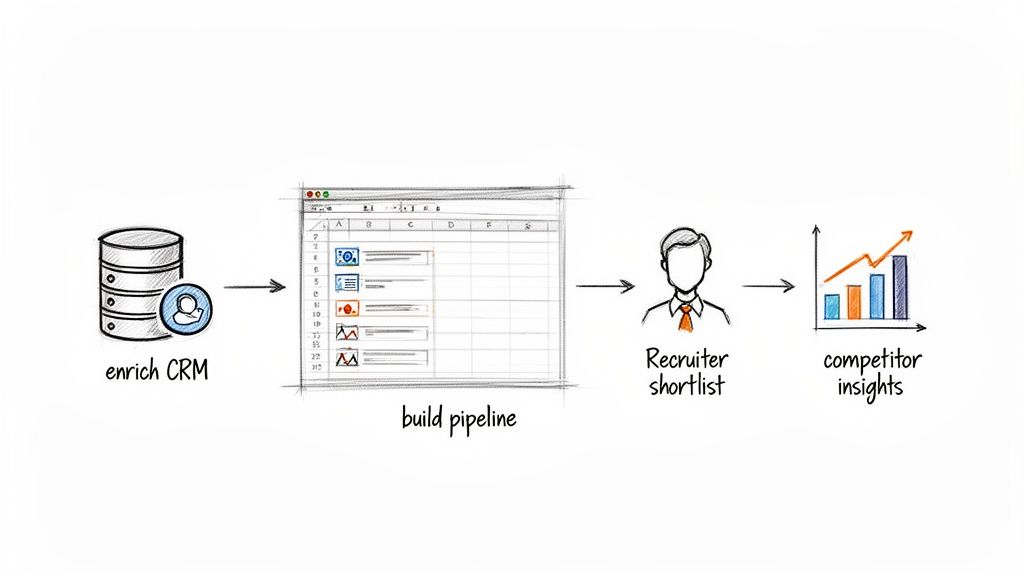
Let’s get practical and explore some killer playbooks that different teams can use right away.
The web scraping market is exploding—growing at a 17.8% CAGR and on track to hit $3.3 billion by 2033. Why? Because sales pros and recruiters are hungry for smarter automation. Teams using modern tools are seeing 30-40% time savings on data collection with up to 99.5% accuracy. That’s the quality you need to make real decisions.
For a deeper dive, check out this great read on the growing role of AI in web scraping.
Playbook for Sales Teams: Build a Lead Generation Machine
For anyone in sales, scraped LinkedIn data is gold. Forget buying stale, generic lists. This is about building hyper-targeted campaigns that get a response because they’re aimed at the right people, right now.
Define Your Target: Run a specific LinkedIn search like "VPs of Marketing in SaaS companies with 50-200 employees."
Scrape the Data: Use your browser agent to grab names, job titles, companies, and profile URLs from the search results.
Enrich and Engage: Use another tool to find verified work emails for your list. Then, upload the contacts into your CRM or sales platform to kick off a personalized outreach sequence.
You've just turned a manual task into an automated lead gen engine. For more ideas, check out our guide on LinkedIn lead generation strategies.
Playbook for Recruiters: Create a Proactive Talent Pipeline
Recruiters, stop being reactive. Use scraped data to build a proactive talent pipeline. This puts you in the driver's seat, letting you find and engage top-tier candidates before your competitors even post a job.
Identify Talent Hubs: Pinpoint the companies known for hiring the best people in your field.
Scrape Employee Lists: Go to their LinkedIn company pages and scrape their public employee lists, filtering for the job titles that matter to you.
Build a Watch List: Import this hand-picked list into your Applicant Tracking System (ATS). Tag it as a "watch list" for future openings.
This approach is a game-changer. Instead of starting from scratch every time a new role opens, you have a pre-vetted list of high-potential candidates ready to go.
Playbook for Marketers: Gain Competitive Intelligence
For marketers, LinkedIn data is a secret weapon for competitive intelligence. By watching the right signals, you can decode your competitors' strategies, spot market trends, and uncover partnership opportunities.
Track Key Competitors: Set up a recurring scrape of the "People" tab on your top competitors' LinkedIn pages to see who they're hiring.
Monitor Job Postings: Track their open jobs. Are they suddenly hiring a dozen new salespeople? That’s a huge tell—they're probably expanding into a new market.
Analyze and Act: Use these insights to inform your own product roadmap, sharpen your marketing messages, and outmaneuver the competition.
Each of these playbooks shows how that simple CSV file you created can become a massive strategic asset when connected to a clear business goal.
Common Questions About Scraping LinkedIn
Diving into LinkedIn data extraction for the first time? It's normal to have a few questions. Let's tackle the big ones head-on so you can move forward with confidence.
Is It Legal to Scrape LinkedIn Data?
Yes, scraping publicly available data is generally considered legal in the U.S. This position is backed by the landmark hiQ Labs v. LinkedIn court case.
The key takeaway from that ruling was simple: if information is publicly visible on the web and doesn't require a password to see, it’s fair game for data collection. However, it's important to distinguish between what’s legal and what’s against a platform's Terms of Service. Aggressive scraping can still get your LinkedIn account suspended, which is why a smart, respectful approach is non-negotiable.
Could My LinkedIn Account Get Banned?
There's a small risk, but it's almost always tied to using aggressive, bot-like tools that hammer LinkedIn's servers with too many requests. LinkedIn's systems are built to catch and shut down that kind of obvious, unnatural activity.
Here's how you fly under the radar:
Use a browser-based tool: These tools work from within your own browser, making your activity look just like regular browsing.
Don't get greedy: Stick to around 80-100 profiles per day.
Add natural delays: The best automation tools automatically build in small, random pauses between actions.
Stick to these best practices, and you'll protect your account while gathering incredible data.
Do I Need to Be a Coder to Scrape LinkedIn?
Absolutely not. While developers can write custom Python scripts, the game has totally changed. Modern no-code tools have opened up the world of LinkedIn scraping to everyone, regardless of technical background.
AI-powered browser extensions are a perfect example. They let you point and click on the data you want right on the LinkedIn page. You can build a powerful scraper in minutes without ever looking at a line of code.
This shift means you can stay focused on your real goals—like building lead lists or finding candidates—instead of getting lost in the technical weeds.
What Kind of Data Can I Get from LinkedIn?
You can pull a massive amount of public data from both personal profiles and company pages, which is perfect for creating structured databases for your business.
Here's a sample of what you can extract:
From Profiles: Full names, job titles, current and past companies, locations, skills, education history, and the profile URL.
From Company Pages: Company name, industry, employee count, HQ location, official website, and lists of their public employees.
This structured data is pure gold for building hyper-targeted sales lists, sourcing top-tier talent, conducting market research, or keeping a close watch on your competitors.
Ready to stop copying and pasting and start automating? Clura is a browser-based AI agent that lets you scrape clean, structured data from LinkedIn in a single click. Build powerful lead lists, monitor competitors, and enrich your CRM without writing a single line of code. Explore our prebuilt templates and start for free!
